








Explore how bitsIO's innovative solutions drive efficiency, enhance performance, and deliver impactful results for businesses across various sectors.
Dive into our extensive library of resources tailored to enhance your experience with Splunk and other leading technologies. Keep up with the latest industry trends, best practices, and expert insights to fuel innovation and help you reach your goals.

Splunk Cloud Migration is the process of moving from on-premises Splunk Enterprise to Splunk Cloud Platform, including data, dashboards, apps, integrations, and security and compliance configurations. The goal is to reduce platform management overhead while keeping the same Splunk capabilities.
Timelines vary by environment size, but bitsIO can complete migrations in as little as 24 to 48 hours for straightforward setups. Larger environments with custom apps, restricted data, or hybrid search needs typically take longer and are scoped during a pre-migration assessment.
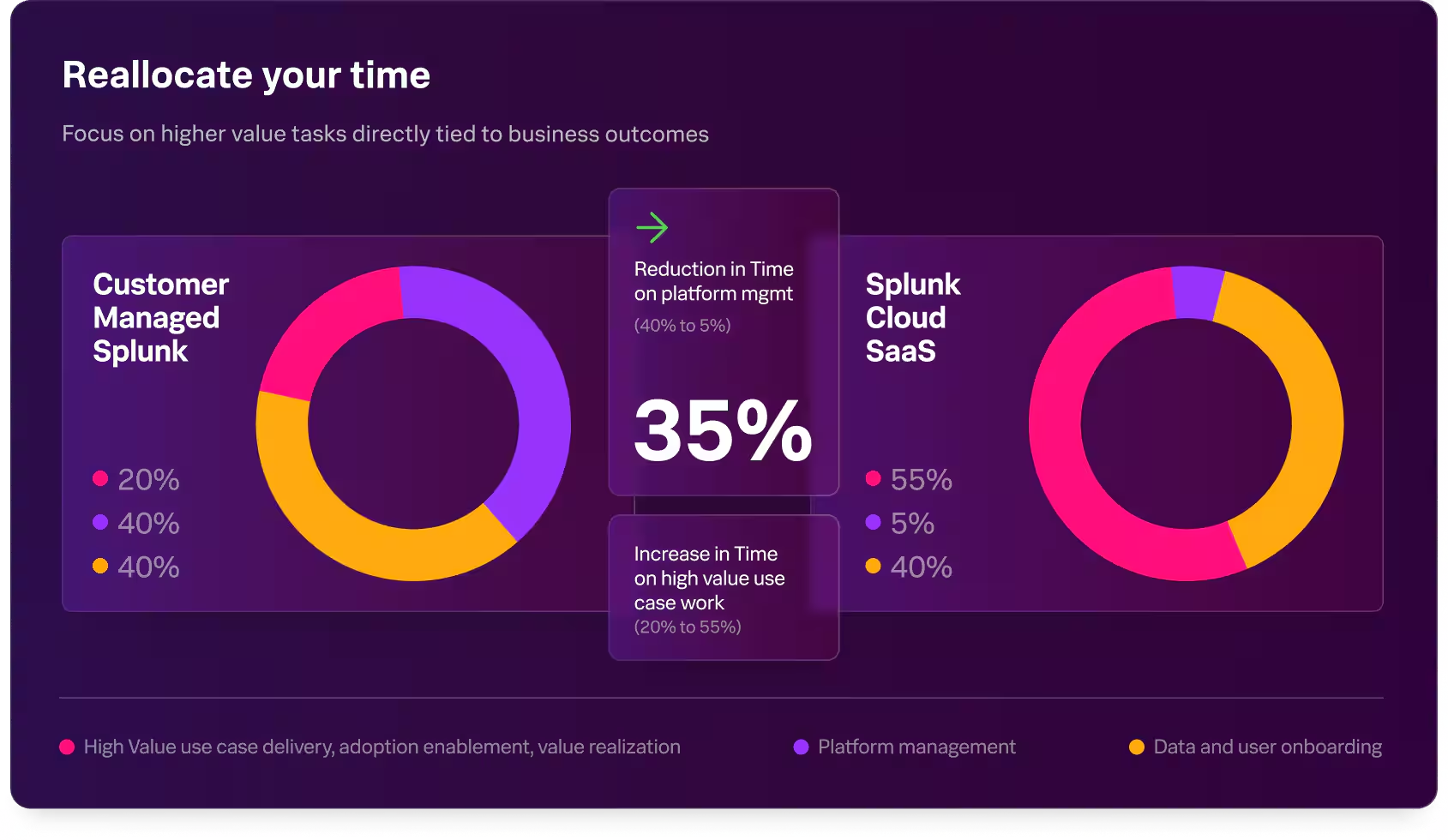
Moving to Splunk Cloud reduces platform management workload (around 35% in Splunk's published benchmark for a 1 TB deployment), shifts infrastructure responsibility to Splunk, supports elastic scale, and simplifies updates and patching. It also makes disaster recovery and compliance baselines easier to maintain.
bitsIO runs an environment health check, generates an automated compatibility report, drafts the migration SOW, and executes the migration with certified consultants. The team also handles post-migration configuration, hybrid search setup, and security and compliance validation.
Most Splunk apps and dashboards are compatible with Splunk Cloud, but some apps and customizations require updates or replacement. bitsIO's pre-migration assessment catches incompatibilities up front so they can be fixed or replaced as part of the migration plan.
Splunk Cloud supports common compliance standards including HIPAA, PCI-DSS, and SOX, and offers regional deployments to meet data residency requirements. bitsIO can validate that your migrated environment meets the specific compliance scope you need.
Yes. Some organizations keep specific datasets on-premises for compliance or latency reasons and run the rest in Splunk Cloud. bitsIO can architect and operate hybrid deployments, including federated search across on-prem and cloud Splunk instances.
Common risks include app incompatibility, performance differences for custom search-heavy workloads, data residency or compliance constraints, and integration changes for tools that previously connected directly to indexers. A pre-migration assessment surfaces these risks so they can be addressed before cutover.
Splunk Cloud uses workload-based pricing (SVC) or ingest-based pricing depending on the contract, and includes the cost of infrastructure managed by Splunk. Splunk Enterprise pricing is ingest-based and excludes infrastructure, which you operate yourself.
Yes. Historical Splunk Enterprise data can be migrated to Splunk Cloud, although the approach (and time required) depends on data volume, retention requirements, and whether the data is hot, warm, cold, or frozen. The historical data plan is scoped as part of the migration design.

We're a team of passionate experts helping businesses like yours extract maximum value from their data investments. Whether you need to streamline data pipelines, build AI-powered solutions, or unlock advanced analytics, we have the expertise to guide you through every step.


920 South Spring St, Ste 1200, Springfield, IL, 62704




Copyright © 2026 bitsIO | All Rights Reserved.