
Summarize the Content of the Blog





Key Takeaways
70-80% of Splunk data goes unused, wasting significant license costs—proper optimization can save 40% annually
Monitor license usage with Splunk's native reports to identify your top data consumers and set alerts at 80% of daily quota
Filter low-value data (DEBUG logs, health checks, routine events) before indexing using Ingest Actions—filtered data doesn't count against your license
Implement smart sampling: index 100% of critical events (errors, security alerts) while sampling only 10-20% of routine logs like Windows Events and firewall traffic
Use Federated Search to query historical data stored in Amazon S3 directly without ingesting it—zero license consumption for compliance and archival data
Measure data utilization by identifying which sources have active dashboards, reports, and alerts versus data sitting unused, consuming license quota
Implement three-tier data architecture: hot data (full indexing), warm data (selective filtering), cold data (S3 storage with Federated Search)
Configure retention policies based on actual needs: compliance data 3-7 years, security logs 1-2 years, application logs 30-90 days
Conduct monthly license reviews and quarterly deep dives to maintain optimization as your environment evolves
Partner with experts like bitsIO (4-time Splunk Partner of the Year) for professional services, including license optimization, implementation, and managed services
Use AI-powered tools like datasensAI to identify underutilized data sources and get actionable recommendations in days, requiring only 2-4 hours of your time
Start today by enabling license monitoring, identifying high-volume sources, and asking: "Is this data delivering value proportional to its cost?"
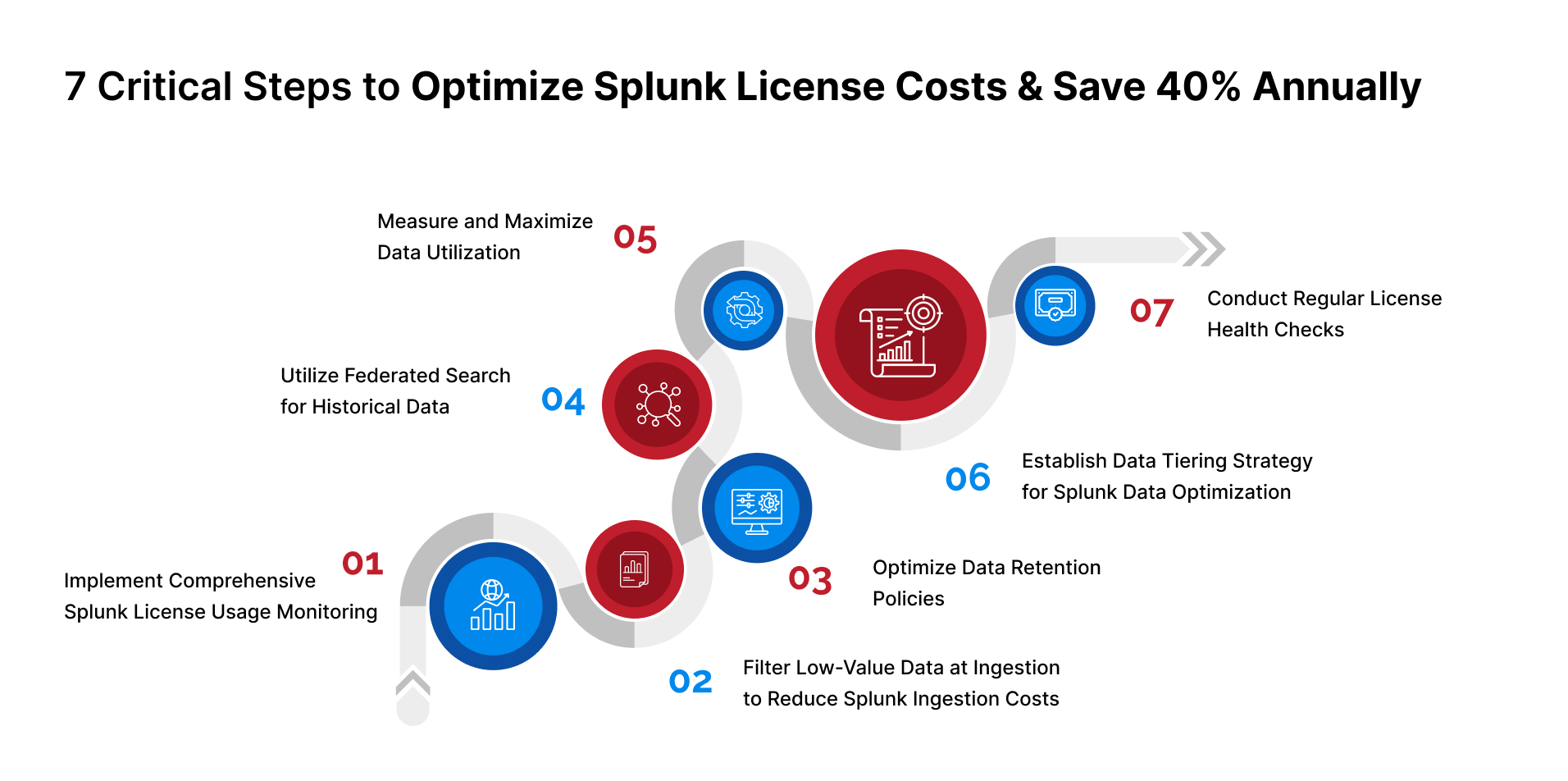
Organizations investing in Splunk face a common challenge: maximizing return on investment while managing ever-growing data volumes. According to industry research, 70-80% of ingested data often remains untapped, representing significant wasted potential and unnecessary license costs. This comprehensive guide provides seven actionable steps to optimize Splunk license costs—grounded in Splunk's official documentation and industry best practices—helping you achieve substantial Splunk license savings annually.
Step 1: Implement Comprehensive Splunk License Usage Monitoring
Before implementing any Splunk cost optimization strategy, you need visibility into how your license is being consumed. Splunk provides native tools specifically designed for tracking license usage and identifying cost reduction opportunities.
Use the License Usage Report View
Splunk Enterprise includes a comprehensive License Usage Report that tracks indexing volume by source, source type, host, and index. This foundational tool is essential for understanding what's driving your license consumption.
Access this report through Settings > Licensing > Usage Report to view:
- Current day license usage and warnings
- Historical usage over the previous 30 or 60 days
- Peak and average volumes by data source
- License consumption split by index, source type, or host
Enable Platform Alerts
The Monitoring Console provides platform alerts that can notify you when license usage reaches critical thresholds. Set up alerts to trigger when you reach 80% of your daily quota, giving you time to investigate and address usage spikes before generating license warnings.
Track Key Metrics
Monitor these critical indicators for effective license management:
- Daily indexing volume: Measured midnight to midnight on your license manager
- License warnings: Five warnings in a rolling 30-day period result in a violation
- Source type distribution: Identify which data sources consume the most license
- Index-level consumption: Understand license allocation across different indexes
Step 2: Filter Low-Value Data at Ingestion to Reduce Splunk Ingestion Costs
Not all data provides equal value. According to Splunk Lantern, filtering low-value events before they reach indexers is one of the most effective strategies for Splunk cost optimization, as filtered data doesn't count against your license.
Leverage Ingest Actions
Splunk's Ingest Actions feature allows you to filter, mask, and route data before indexing. This capability is transformational for organizations looking to reduce costs while maintaining visibility into critical events.
Key capabilities include:
• Filter events: Remove DEBUG logs, health check messages, and redundant events that consume license quota without delivering value
• Mask sensitive data: Redact PII and other sensitive information while maintaining searchability
• Route selectively: Send low-value data to cheaper storage like Amazon S3 while routing high-value data to Splunk indexes
Critical advantage: Data filtered or routed by Ingest Actions does not count against your license if it never reaches an index. This is one of the quickest ways to lower your Splunk bill.
Implement Data Sampling
For high-volume, low-criticality data sources like Windows logs or firewall noise, consider sampling strategies. Using Ingest Actions' Filter using Eval Expression rule, you can implement percentage-based sampling. For example, indexing only 10% of routine Windows Event logs can reduce license consumption by 90% while maintaining statistical validity for trend analysis.
Configure conditional sampling that always indexes critical events (like errors and security alerts) while sampling routine information logs. This ensures you maintain security visibility while achieving significant Splunk license savings.
Step 3: Optimize Data Retention Policies
While retention doesn't directly impact license costs (licenses measure ingestion, not storage), proper retention policies prevent unnecessary re-ingestion and support your overall data optimization strategy.
Align Retention with Business Requirements
Different data types have different retention requirements. Create separate indexes for data with varying retention needs:
- Compliance data: Often requires 3-7 years retention
- Security logs: Typically 1-2 years for investigation capabilities
- Application logs: Often 30-90 days for troubleshooting
- Debug logs: 7-14 days for immediate troubleshooting
Configure frozenTimePeriodInSecs
In your indexes.conf file, set the frozenTimePeriodInSecs parameter to control how long data remains searchable. After this period, data moves to frozen status and is typically deleted unless you've configured archival.
Implement Searchable vs. Archive Storage
Splunk Cloud Platform offers Dynamic Data Active Archive (DDAA) for long-term retention of infrequently accessed data. This keeps data available for compliance without the cost of maintaining it in hot/warm storage. You can also configure self-storage using Amazon S3 for even more cost-effective long-term retention.
Step 4: Utilize Federated Search for Historical Data
One of the most impactful strategies for Splunk cost optimization is leveraging Federated Search for Amazon S3 to query historical data without ingesting it into Splunk.
How Federated Search Reduces Costs
Federated Search for Amazon S3 allows you to search data stored in S3 buckets directly from Splunk Cloud Platform without consuming any license quota. This capability is transformational for organizations with substantial compliance or archival requirements.
Ideal use cases include:
- Security investigations over historical data: Search multiple years of logs stored in S3 for forensic investigations
- Compliance audits: Maintain audit trails in S3 while keeping them instantly searchable
- Statistical analysis: Perform infrequent analysis over large datasets without the cost of continuous indexing
- Break-glass scenarios: Keep historical data available for rare but critical investigations
Implementation Strategy
Route low-frequency, high-retention data directly to S3 using Ingest Actions, then configure AWS Glue Data Catalog tables to enable Federated Search. This approach can dramatically reduce licensing costs for compliance and archival data that's searched infrequently.
Important note: Federated Search is not intended for real-time or high-frequency searches. It complements—not replaces—traditional Splunk indexing for operational use cases.
Step 5: Measure and Maximize Data Utilization
Identifying which data sources provide actual value versus those consuming license quota without delivering insights is crucial for optimization. Understanding your data utilization patterns reveals opportunities for both cost reduction and improved ROI.
Assess Knowledge Object Usage
According to Splunk documentation, knowledge objects—including dashboards, reports, alerts, data models, and saved searches—are the building blocks that transform raw data into actionable insights. Data that isn't referenced by any knowledge objects may not be delivering value proportional to its cost.
Run audit searches to identify:
- Which indexes are actively searched by users
- Which source types appear in saved searches and dashboards
- Which data sources trigger alerts and automated actions
- Which data models reference specific data sources
The Data Utilization Scoring Approach
While Splunk provides native tools for monitoring license usage, advanced data utilization analysis can reveal deeper optimization opportunities. Tools like datasensAI introduce sophisticated scoring mechanisms that calculate utilization based on knowledge object creation and usage patterns.
These scoring systems typically evaluate data sources along two dimensions:
- High Score: Data sources with extensive knowledge object usage, demonstrating strong ROI and justifying license allocation
- Low Score: Underutilized data sources that represent optimization opportunities—either through better utilization or license reallocation
For teams with low-scoring data sources, this analysis reveals opportunities to either develop better use cases that extract value from the data, or redirect license quota to higher-value sources. For teams with high-scoring data, the validation confirms effective data usage and can identify opportunities for strategic expansion.
Key benefit: This approach connects data utilization directly to business outcomes, helping organizations make informed decisions about license allocation based on actual value delivered rather than volume alone.
Step 6: Establish Data Tiering Strategy for Splunk Data Optimization
Not all data needs the same level of accessibility or processing. A mature data tiering strategy routes data to appropriate storage based on its value and access frequency, which is essential for effective Splunk data optimization.
Define Your Tiers
Create a three-tier architecture:
- Tier 1 - Hot Data: Mission-critical, frequently searched data that justifies full Splunk indexing. This includes active security monitoring, real-time alerting, and operational dashboards.
- Tier 2 - Warm Data: Moderate-value data with occasional access needs. Route this to indexes with shorter retention or consider Ingest Actions with selective filtering.
- Tier 3 - Cold Data: Compliance and archival data searched infrequently. Route directly to S3 and access via Federated Search when needed.
Implement Automated Routing
Use Splunk's Edge Processor and Ingest Processor solutions to automatically route data to appropriate tiers based on source type, content, or business rules. This ensures high-value data receives full processing while lower-value data takes cost-effective paths through your infrastructure, optimizing both performance and license consumption.
Step 7: Conduct Regular License Health Checks
License optimization isn't a one-time project—it requires ongoing attention as your data landscape evolves.
Establish a Monthly Review Process
Schedule monthly reviews to:
- Analyze license usage trends and identify anomalies
- Review new data sources added to the environment
- Assess the effectiveness of existing filters and routing rulesIdentify opportunities to move additional data to Federated Search
- Validate that knowledge objects are being created for new data sources
Conduct Quarterly Deep Dives
Every quarter, perform comprehensive analysis:
- Review all indexes and their consumption patterns
- Interview stakeholders about their data needs and usage patterns
- Assess whether retention policies still align with business requirements
- Calculate actual ROI by comparing license costs to business value delivered
- Update your data tiering strategy based on changing access patterns
Document and Communicate
Maintain clear documentation of your license management policies and share regular reports with stakeholders. When teams understand how license costs are allocated and the impact of their data sources, they become partners in optimization rather than obstacles.
Partner with Experts: How bitsIO Accelerates Your Splunk Success
While the seven steps above provide a roadmap for optimization, many organizations find that expert guidance accelerates results and uncovers opportunities they would have missed. This is where partnering with a trusted Splunk professional services provider becomes invaluable.
bitsIO: Your Trusted Splunk Professional Services Partner
With over 200 years of combined Splunk experience across our certified team, we've helped 300+ enterprise clients across finance, healthcare, government, retail, and technology sectors maximize their Splunk investments while achieving measurable cost reductions.
Comprehensive Splunk Professional Services
Our Splunk Professional Services cover the entire lifecycle of your Splunk environment:
- Implementation & Migration: From greenfield deployments to complex cloud migrations, we design and implement Splunk architectures tailored to your specific needs
- License Optimization: We conduct comprehensive health checks to identify license waste, implement filtering strategies, and negotiate optimal license structuresData Onboarding: Expert onboarding of diverse data sources with proper parsing, filtering, and routing configurations
- Enterprise Security & ITSI: Specialized implementation of Splunk Enterprise Security and IT Service Intelligence with correlation rules, reports, and use case development
- Managed Services: 24/7 monitoring, management, and optimization of your Splunk environment as your dedicated MSP/MSSP
- Architecture Reviews: Distributed architecture assessments and indexing strategy optimization to reduce storage costs
datasensAI: AI-Powered Splunk ROI Optimization
Beyond traditional professional services, bitsIO developed datasensAI—a Splunk-certified app that brings AI-driven intelligence to license optimization. This innovative tool addresses the core question every organization should ask: "Is our data delivering value proportional to its cost?"
datasensAI analyzes your Splunk environment to calculate utilization scores based on knowledge object creation and usage. It identifies:
- Which data sources are actively driving business value through dashboards, alerts, and reports
- Which data sources are consuming license quota without generating insights
- Opportunities to reallocate licenses from underutilized to high-value data sources
- AI-generated use case recommendations based on MITRE ATT&CK Framework and industry best practices
What sets datasensAI apart: The tool focuses on your top 10 data sources and delivers actionable insights in days, not weeks, requiring only 2-4 hours of your team's time. It seamlessly integrates with Splunk's Data Management Extensions (DMX) to provide a complete view of your data pipeline from ingestion to utilization.
For teams with underutilized data, bitsIO's expert consultants provide personalized support to develop knowledge objects and maximize data visualization. For high-performing teams, the tool validates effective data usage and identifies opportunities for strategic expansion.
Why Organizations Choose bitsIO
Our clients consistently highlight these differentiators:
- Consultative approach: We act as trusted advisors, not just vendors, focusing on long-term success
- Rapid value delivery: Our implementations and assessments deliver measurable results quickly
- Global capabilities: Operating in 5 countries, we provide consistent service across regions
- Deep expertise: 50+ Splunk-certified consultants with specialized knowledge across Enterprise Security, ITSI, and Observability
- Innovation focus: Our suite of AI-powered tools (datasensAI, resilifyAI, QsensAI, OTsensAI) extends Splunk's native capabilities
- Flexible engagement: From single projects to comprehensive managed services, we scale to your needs
Whether you need help implementing the seven optimization steps outlined in this guide, want to explore datasensAI for ROI analysis, or require comprehensive managed services, bitsIO provides the expertise and tools to transform your Splunk investment from a cost center into a strategic advantage.
Conclusion: From Cost Center to Value Driver
Optimizing Splunk license costs isn't about doing less with your data—it's about doing
By implementing these seven steps grounded in Splunk's official capabilities, organizations can:
- Achieve 40% or more in Splunk license savings through intelligent data filtering and tiering
- Maintain or improve security and operational visibility through strategic use of Federated Search
- Eliminate waste by focusing resources on data sources that deliver measurable business value
- Build a sustainable, scalable approach to data management that grows with your organization
- Transform Splunk from a cost concern into a strategic advantage
The journey to license optimization begins with visibility—understanding not just what data you're ingesting, but whether that data is truly working for your organization. Whether you use Splunk's native tools, specialized apps like datasensAI, partner with experts like bitsIO, or combine all three approaches, the key is taking action based on data-driven insights rather than assumptions.
Start with Step 1 today: enable comprehensive monitoring, identify your highest-cost data sources, and begin asking the critical question that drives all optimization efforts: "Is this data delivering value proportional to its cost?" The answer to that question will guide every optimization decision that follows.
Ready to Optimize Your Splunk Investment?
Don't let 70-80% of your Splunk license go to waste. Partner with bitsIO to unlock the full potential of your data infrastructure and achieve measurable cost savings.
Schedule a free consultation today to:
- Assess your current Splunk environment and identify optimization opportunities
- Explore how datasensAI can uncover hidden savings in your data
- Discuss tailored Splunk Professional Services for your organization
- Get a roadmap for achieving 40% annual cost savings